Depuis son origine le simulateur utilisait la suite VDE2 pour les switchs virtuels. Les switchs VDE2 sont administrables, mais cela était difficile de les intégrer tels quels dans le projet Network-In.
De ce fait, depuis la version 2.1, le projet Network-In utilise des switchs virtuels dérivés des switchs VDE2 : un fork de VDE2 est désormais utilisé et développé spécialement pour Network-In : Vde4Networkin.
Pour l'utilisateur, cela a permis d'ajouter un nouveau type de switch administrable, permettant la création de VLAN, offrant la gestion de STP (spanning tree), de la table MAC, le comptage des trames, etc.
Une interface utilisateur en mode console CLI en permet l'administration.
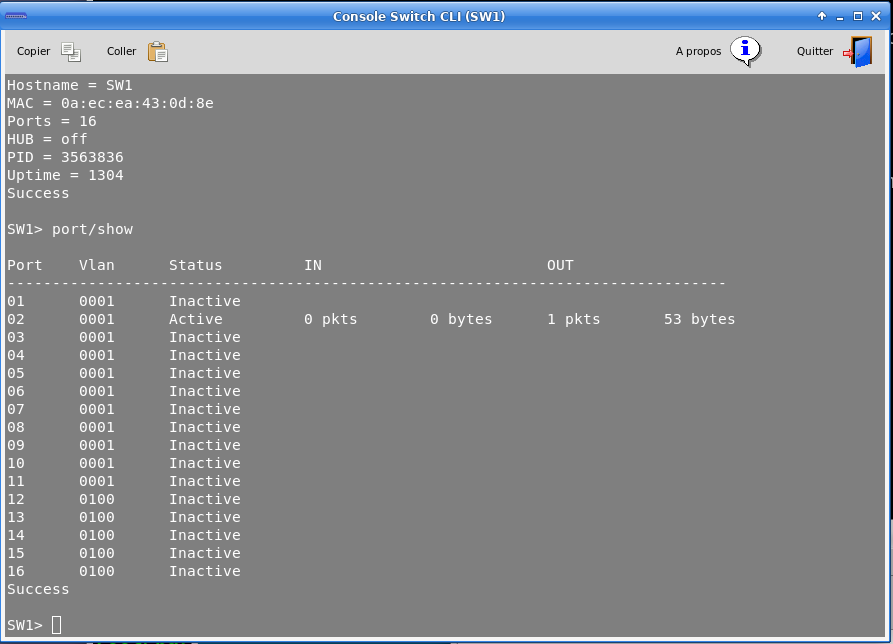
Cette interface est facile a utiliser, elle a été adaptée pour une prise en main rapide, étant assez proche de Cisco notamment.
Commandes de l'interface CLI
La commande help ou ? donne accès à l'ensemble des commande et leurs explications.
COMMAND PATH ARGUMENTS HELP
------------ -------------- ------------
? [arg] Help (limited to arg when specified)
help [arg] Help (limited to arg when specified)
hostname NAME set switch name
load PATH load a configuration script
logout logout from this mgmt terminal
save [PATH] save configuration in file (default file path if not completed)
sethub off(default)/on enable or disable hub mode
show show switch version and more info
shutdown shutdown of the switch
mac ============ HASH TABLE MENU
mac/setexpire N change MAC entries expire time
mac/show show MAC table
stp ============ RAPID SPANNING TREE MENU
stp/disable disable STP
stp/enable enable STP
stp/portcost VLAN PORT COST set the port cost for a VLAN
stp/portfast VLAN PORT on/off Define or cancel an edge port for a vlan
stp/priority PRIORITY set switch priority (value between 0 and 61440
stp/show [VLAN] show spanning tree data for the defined vlan
port ============ PORT STATUS MENU
port/resetcounter [PORT] reset the port (PORT) counters
port/setvlan PORT VLAN set port VLAN (untagged)
port/show [PORT] print the port table
vlan ============ VLAN MANAGEMENT MENU
vlan/addtrunkport VLAN PORT add trunk port to the vlan N
vlan/create VLAN create the VLAN with tag N
vlan/deltrunkport VLAN PORT del trunk port to the vlan N
vlan/name VLAN NAME set the NAME for VLAN tag N
vlan/show [VLAN] print the list of defined vlan
vlan/remove VLAN remove the VLAN with tag N